
Assets tracks the installed items the client will inherit — air handling units, pumps, valves, luminaires — from installation through commissioning to handover.
This topic includes:
The register
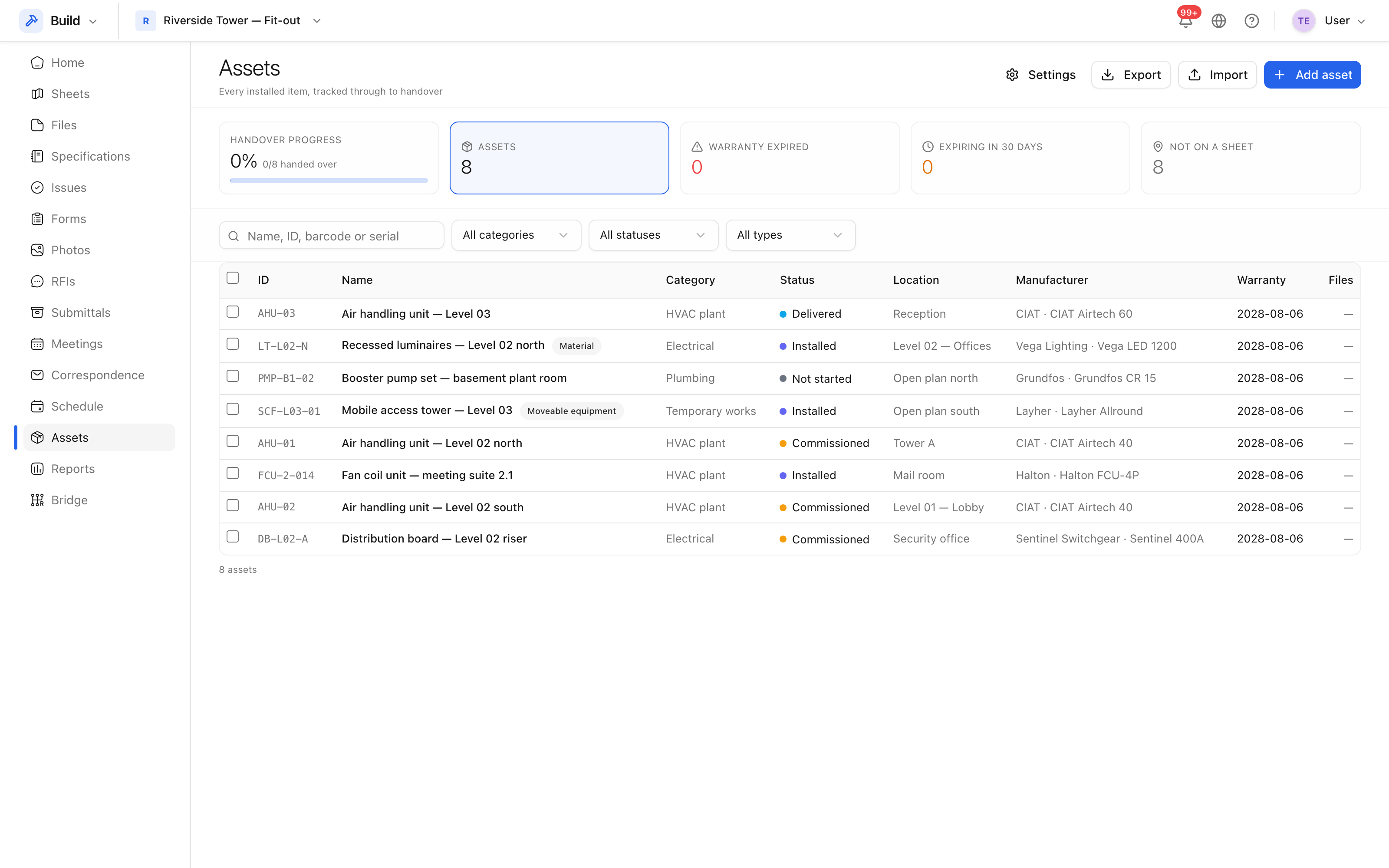 Assets, with handover progress across the top.
Each asset carries an ID (allocated automatically if you leave it blank), a name, a category, a status, a location, a manufacturer, a model and serial number, a barcode, quantities, and installation, commissioning and warranty dates.
The summary tiles above the register are filters: click expired to see only assets whose warranty has lapsed.
Categories, statuses and attributes
- Categories nest, so
Mechanical → Air handling → AHUis one path. - Statuses form the lifecycle the project uses, seeded on first use.
- Custom attributes add fields the standard ones do not cover, per category or across the project. An attribute can be required, in which case an asset cannot be saved without it.
Note: a required attribute with no category applies to every asset on the project. That is deliberate, but it means one required attribute makes every new asset need it.
Import and export
Assets usually arrive as a spreadsheet from the installing contractor. Import a CSV and the register reports how many rows were created and which were rejected, with the reason for each — a row with a nonsense quantity does not abort the import.
Export gives you the register as it is currently filtered.
Every change to an asset is recorded in its history, so handover has an audit trail.