
A notification group is a named audience subscribed to some or all of a project's tools. It is how somebody who is not assigned anything still hears what is going on.
This topic includes:
Create a group
- Open Project Admin → Notifications.
- Click Create notification group.
- Give it a title.
- Choose the Recipients: All Members, or any mix of individual members, roles and companies.
- Choose the Tools the group follows. Leave it empty and the group follows every tool on the project.
- Click Create.
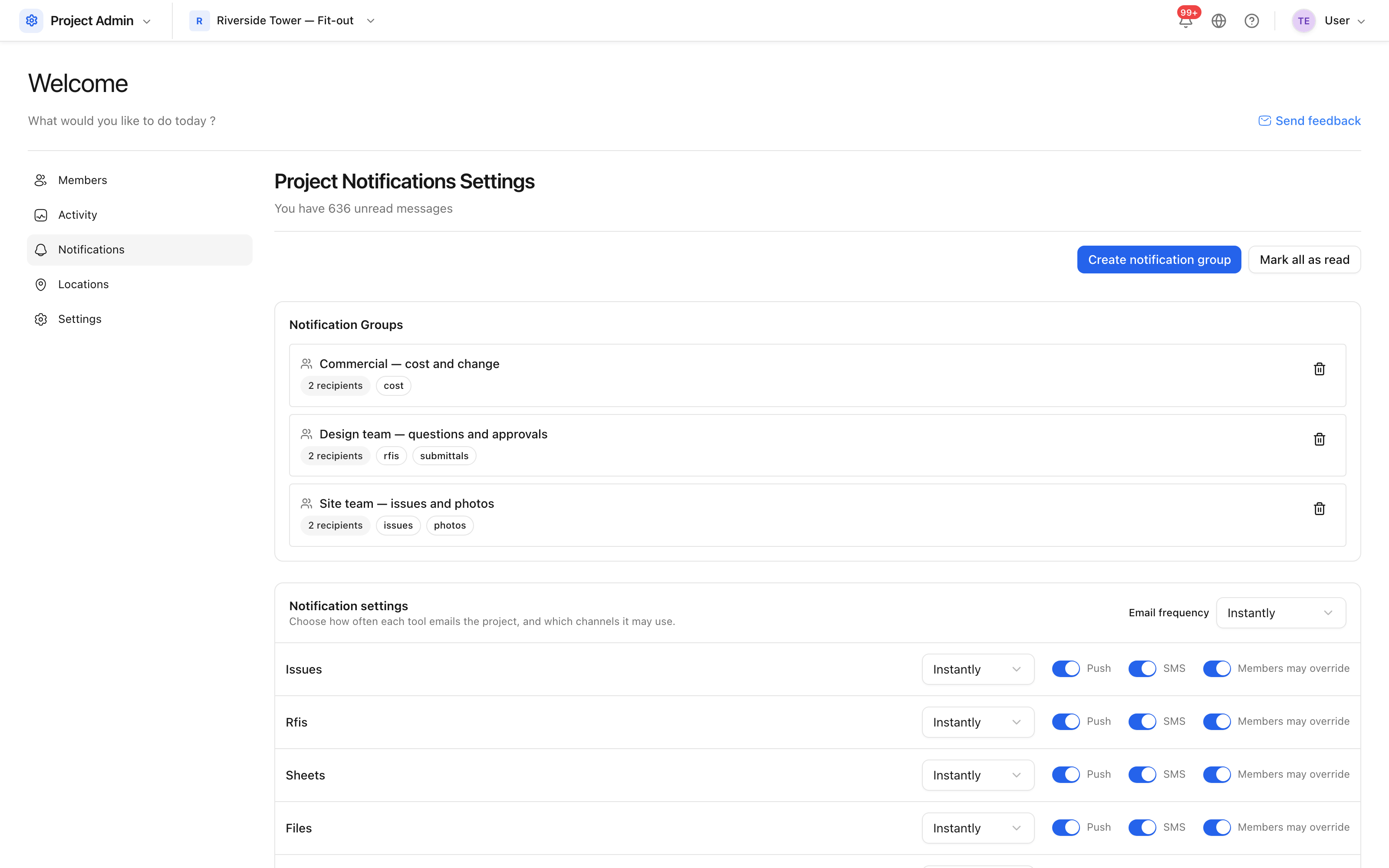 The groups on a project, with the tools each one follows.
A group must name somebody. One that reaches nobody would never fire, so Create stays disabled until an audience is chosen.
How a group changes who is told
A group only ever widens an audience. Everyone it reaches still passes through their own preferences, so:
- Adding somebody to a group does not override a tool they have muted.
- It does not turn on a channel they have switched off.
- It cannot notify somebody about their own action.
Naming a role or a company selects the people on this project who match — not everyone in the account who happens to hold that role.
Tip: a group scoped to one tool is usually more useful than one following everything. "Commercial team → cost" keeps the quantity surveyors informed without sending them every photograph.