
A submittal is one thing being put forward for approval — a product, a shop drawing, a sample, a calculation — tied to the specification section that demanded it.
This topic includes:
Create the item
- Open Submittals and click + Create item.
- Give it a title that names the thing, not the task: "Partition system — shop drawings", not "Submittal 12".
- Choose the specification section it answers.
- Set the type, the responsible contractor and the due date.
- Save.
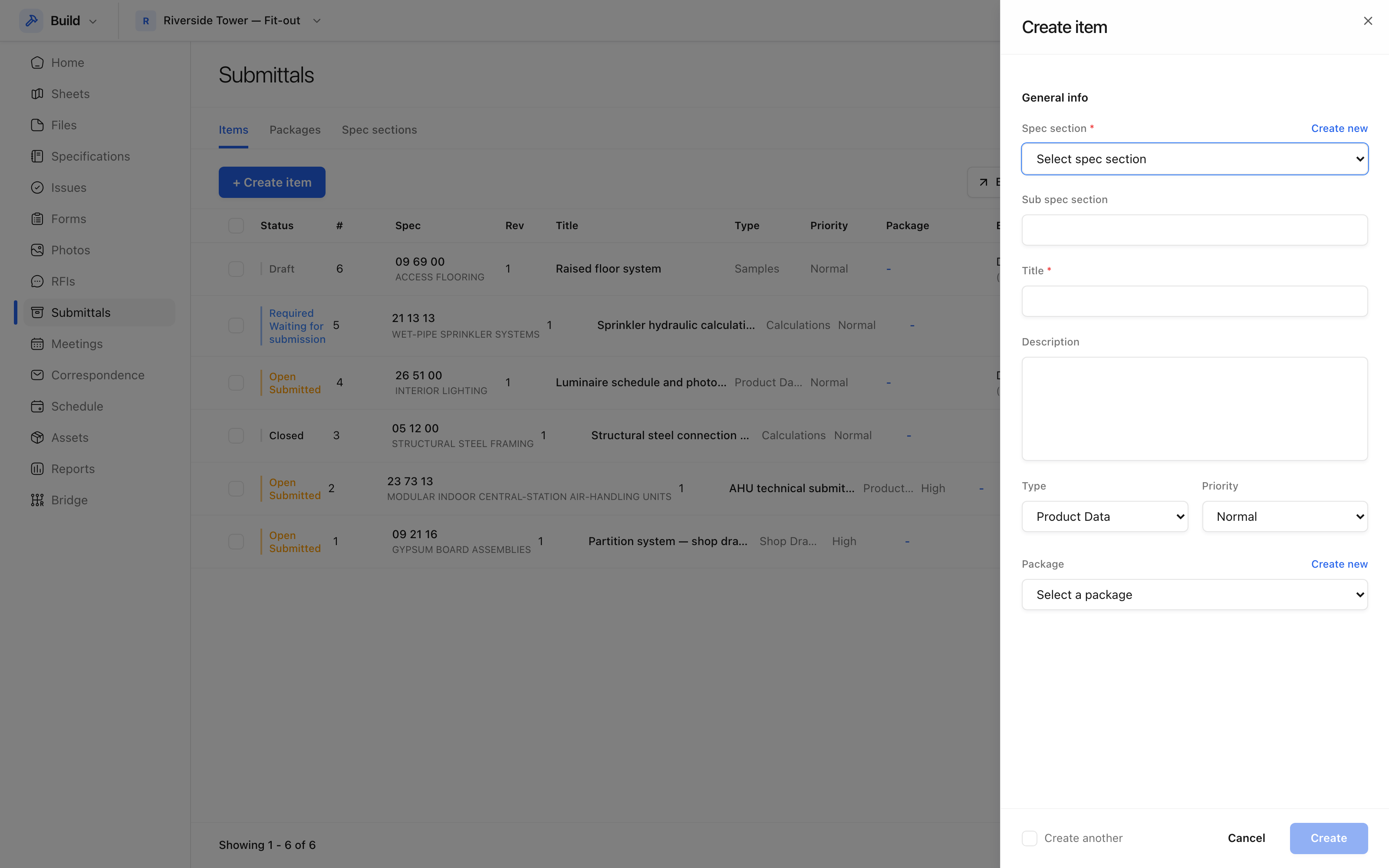 A submittal is raised against a spec section, which is what makes the register
answerable by section.
A submittal is raised against a spec section, which is what makes the register
answerable by section.
The fields that matter
| Field | Why it matters |
|---|---|
| Spec section | Lets you ask "what is outstanding against 09 21 16?" |
| Type | Shop drawings, product data, samples, calculations |
| Responsible contractor | Who has to produce it |
| Manager | Who runs the review on your side |
| Due date | Worked back from when the material is needed on site |
| Revision | Increments when a rejected submittal comes back |
Set the due date from the procurement lead time, not from the programme date for the work. A submittal approved the week the material is needed is a submittal approved too late.
Packages
Where several items belong together — everything for the curtain walling, say — group them into a package. The package is then the thing that gets tracked and issued, while the items inside it keep their own statuses.